Wow, I have so many learning experiences that I can pull from for this post. The teaching strategies that were most effective to my learning style, are those that had me involved. For instance, my best biology class was where we learned about the systems and difference between animals by dissecting them. I am not a fan of cruelity to animals but how else could you see things if not for a right there pictures.
The teaching strategies that are less effective are those that only focus on auditory After a while my brain tunes out and the teacher had to say "Hey You".
Our focus should be motivating them to have the drive to explore and find their way given the tools they have. Our focus should be all or nothing.
Tuesday, August 16, 2011

Social Networking CEP 810
Social networks are everywhere in my life, both work and personally. The one I use most is facebook in my personal life. However in my professional life I have used LinkedIn quite a bit for job hunting and finding and networking my Tupperware business. I have used my social network to answer questions about baby issues, if they are normal or not being that it is my first child. People are so helpful in giving their opinions. Networks let me send out a question and the responses just keep pouring in. Facebook is the social network I believe the students use most because they are most versed in it. They use it to communicate with friends. My peers use it for everyday questions in their classrooms and to get ideas and lesson plans from others.
Getting Things Done- Jennifer Forbes
The Getting Things Done, by David Allen was an interesting read. I would like to think that this is helping to get the show in the air as well as.
I do think this process will help me because I am a list person. I have no problem making lists that end up being 20 things long and can't be done in that time frame and then the list gets moved etc. So now I can organize it by short time and long time goals, daily goals, and then weekly , monthly, etc. the 43 folders rule. This makes the list specialized for that day/week.
I think I will continue to split my list with those that can be done in two minutes and then the rest will be organized with the system. I like folders so I will continueto use them as my inbox. I will stay organized and be efficient too.
- How did you organize your process? (are you using paper and pencil, a phone, a piece of software)?
- What was it like for you going through the process the first time?
- Do you think that this process will help you? Why or why not?
- Do you think you will continue this process? If not, what will your process be?
I do think this process will help me because I am a list person. I have no problem making lists that end up being 20 things long and can't be done in that time frame and then the list gets moved etc. So now I can organize it by short time and long time goals, daily goals, and then weekly , monthly, etc. the 43 folders rule. This makes the list specialized for that day/week.
I think I will continue to split my list with those that can be done in two minutes and then the rest will be organized with the system. I like folders so I will continueto use them as my inbox. I will stay organized and be efficient too.
Sunday, August 14, 2011
Personal Learning Reflection CEP 810/811
Personal Learning Reflection
By: Jennifer Forbes
CEP 810/811
As school ended this year I was dreading taking these classes CEP 810 and CEP 811, Teaching Understanding with Technology. I have never thought of myself as a “technical” person. Yes, I know the basics and can teach them to my students, but technologically inclined I am not. This being said I was not excited to take a class where I thought I was going to do nothing but struggle. Guess what, “I was wrong.” Once the class started I couldn’t believe what I was learning and what I was being asked to do, but it was all layed out and easy to follow and if I needed help there was always someone there to help whether it be a teacher, classmate, or web site.
Throughout the class I have learned several things about effective teaching strategies when integrating technology. I have learned about TPACK and how it influences creativity. Motivation is key in getting students to grab on to a concept that you are teaching. If they have a curiosity they will stay engaged and want to learn what is being taught. When a student has access to technology they have the world at their fingertips. Our job is to give them the tools to use them and a map of what they need to be successful. When integrating technology security is of the utmost importance, if you teach the students how and what to be aware of they will not feel the need to wander. Teachers are meant to be mentors not dictators. This way they can develop the tools to strategize and problem solve.
Integrating the Internet helped me think about and evaluate uses of technology through all of the resources that were brought to my attention that could be found on and using the Internet. When putting together our SIG we used the Internet to compile our resources and save them on a site called Diigo(www.diigo.com.) This site allowed us to share resources with one another and allow each other to edit and comment on what was submitted. The Internet helped me find additional resources to help students and teachers. Google provides several free resources that everyone can use. I had no idea about other than email when I first started. By having all these resources communication becomes easier and instantaneous.
The assignment that I feel best exemplifies good teaching with technology is the SIG presentation on Blogs. This group assignment led us to so many great resources in multiple subject areas that I am anxious to use them throughout the year. As for Blogs, starting one has been fun and informative. I love how our presentation is easy to navigate and gives resources and how to use them all in one spot. The other assignment I really enjoyed was my el dia de los muertos submission to MERLOT. I am proud of that piece of work and will be using it this year.
At this time I have not yet met many of my goals in my personal growth plan as school has not yet started for the year. I have been able to follow up on some resources that I can use to construct lesson plans for the year. I have also found several Blogs that have served as great resources for designing my lesson plans. Since I am also taking CEP 811 as well I have been able to use multiple resources to construct a very “rough” web page that I can use during the year for my students and their parents.
I have a couple new goals that I would like to achieve. The first is I would like to construct a few web quests that I can use in my Spanish classroom. I introduced this concept at the end of last year and the students loved them. I would also like to form a network at school so we can share ideas online using a site such as Google docs or Diigo. My plans for reaching my new goals are to share what I have learned with my co-workers and my principal to allow for time to work together and collaborate on integrating technology into the classroom more than it is. As for long term goals I plan on speaking with an advisor and applying to get into the Masters in Educational Technology Program. It will be a slow road but an achievable one. I would also like to form a technology group at school to discuss how technology can add to the classroom and should not be feared.
Monday, August 8, 2011
Online Experiences Using Technology
- Talk about how you could use one of the technologies that qualify as an online experience with your students.
- What content could this help you teach?
- What type of pedagogical strategies might you use with your students?
- What technologies do you think would be harder to use with your students? Why?
The pedagogical strategies that I might use with my students would be to give them an audiovisual example of the language and text. They could see and hear what the langauge sounds and looks like so those that have difficulty with language can have it read to them and summarized. The technologies that would be harder to use with my students would be Podcasts. Since it is all oral language there is nothing for my students to look at while they are listening.
Sunday, August 7, 2011
Copyright and Fair Use in Education
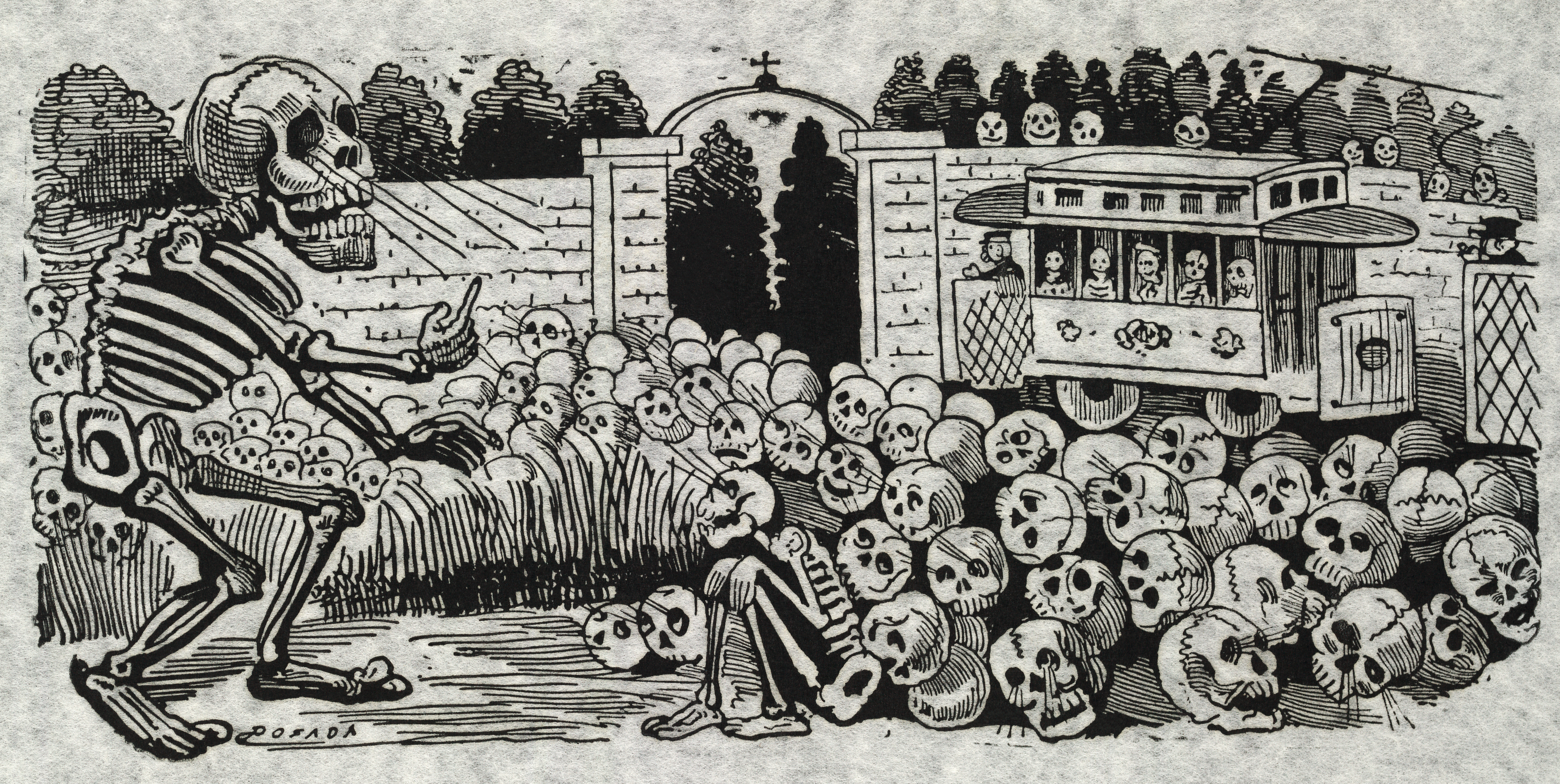
These days it is difficult to find things and give them proper credit because you never know if it is the original or a copy. I have been told so many things in regards to copyright that sometimes I am scared to put things on paper or the internet for fear of not giving credit or plagiarising. Learning about Creative Commons taught me how to look for symbols to see what is copyrighted and what can be used according to the Fair Use Policy. I teach Spanish and images are a big help and use in what I teach because it gives the students a visual of something from another country without being there or leaving the classroom. The following image is that of a popular figure in the Mexican celebration of "el Dia de los Muertos" or Day of the Dead."
http://commons.wikimedia.org/wiki/File:Gran_calavera_el%C3%A9ctrica2.jpg

http://www.flickr.com/photos/66104728@N02/6021298180/in/photostream/
<a rel="license" href="http://creativecommons.org/licenses/by-nc/3.0/us/%22%3E%3Cimg alt="Creative Commons License" style="border-width:0" src="http://i.creativecommons.org/l/by-nc/3.0/us/88x31.png" /></a><br />This work is licensed under a <a rel="license" href="http://creativecommons.org/licenses/by-nc/3.0/us/%22%3ECreative Commons Attribution-NonCommercial 3.0 United States License</a>.
 | This work is in the public domain in Mexico because either its author died more than 100 years ago, it is a work of the Mexican government and it was published more than 100 years ago, or it was already in the public domain in 2003 English | Español | Suomi | Македонски | +/− |  |
| This work is in the public domain in the United States because it was published before January 1, 1923. The author died in 1913, so this work is also in the public domain in countries and areas where the copyright term is the author's life plus 80 years or less. English | Français | 日本語 | Македонски | 中文(简体) | 中文(繁體) | +/− |
http://commons.wikimedia.org/wiki/File:Gran_calavera_el%C3%A9ctrica2.jpg

| Description | English: "Gran calavera eléctrica" (Grand electric skull) "Print shows large skeleton hypnotizing a group of skulls and a sitting skeleton; an electric street car, with skeletons as passengers, is in the background." "1 print on white fabric : relief etching ; 21.4 × 34 cm. (sheet)." Created by José Guadalupe Posada Français : "Gran calavera eléctrica" (Le grand squelette électrique) Gravure de José Guadalupe Posada montrant un grand squelette hypnotisant un autre squelette assis et un ensemble de crânes, ainsi qu'un tramway électique, dont les passagers sont des squelettes, en arrière plan. Dimensions : 21,4 × 34 cm. |
|---|---|
| Date | 1900-1913 |
| Source | Library of Congress |
| Author | Posada, José Guadalupe, 1852-1913, artist. |
| Permission (Reusing this file) | See below. |
| Other versions | Fully restored version of File:Gran calavera eléctrica.jpg. Cropped. Dirt removed. Depigmented areas repigmented. Curves adjusted. See also File:Gran calavera eléctrica1.tif (partial restoration) and File:Gran calavera eléctrica2.tif (full restoration, uncompressed). |

http://www.flickr.com/photos/66104728@N02/6021298180/in/photostream/
<a rel="license" href="http://creativecommons.org/licenses/by-nc/3.0/us/%22%3E%3Cimg alt="Creative Commons License" style="border-width:0" src="http://i.creativecommons.org/l/by-nc/3.0/us/88x31.png" /></a><br />This work is licensed under a <a rel="license" href="http://creativecommons.org/licenses/by-nc/3.0/us/%22%3ECreative Commons Attribution-NonCommercial 3.0 United States License</a>.

Friday, August 5, 2011
Wikispaces
I just started my own wikispace on Favorite Spanish Resources. The web address where you can find me is
http://senoraforbesfavorites.wikispaces.com/Senora%20Forbes%20Favorites
Here is a screenshot of what my wiki page looks like. I hope you enjoy!

http://senoraforbesfavorites.wikispaces.com/Senora%20Forbes%20Favorites
Here is a screenshot of what my wiki page looks like. I hope you enjoy!

Sunday, July 24, 2011
UDL Checklist for Spanish Speaking Country Webquest
I recently applied the Universal Design Learning (UDL) checklist to the Webquest lesson, Identifying Spanish Speaking Countries and was very pleased with the results. Upon completion of the checklist the lesson showed 25 "features" and only 7 "barriers". The main barriers were lack of an auditory component and there were a few barriers on goal settings. It was interesting to critique this lesson plan from a different set of criteria and very satisfying to know that when this lesson was taught it was a strong lesson plan.
Keeping your PC Safe
Remember a time when it was safe to surf the net... when viruses were for people and not computers... well, times have changed. I recently completed 3 tutorials on internet security.
My first tutorial was Defining Malware. I've heard the term malware before but prior to this tutorial all I could tell you, is malware is bad. This tutorial expanded my knowledge and gave me some interesting tidbit to share.
My first tutorial was Defining Malware. I've heard the term malware before but prior to this tutorial all I could tell you, is malware is bad. This tutorial expanded my knowledge and gave me some interesting tidbit to share.
- It is actually a catch all phrase that includes adware and spyware. Prevention is the key to avoiding malware and there are some useful pieces of software.
- Something fun on this one is if Windows cleanup is working it will make the sound of a flushing toilet. By freeing up memory my PC it give me more room for important things, like pictures of my 9 month old son.
- Firewalls don't help if you've already downloaded and installed the virus.
- There is firewall hardware and software. Firewall hardware is part of the routers and is used to hide your computer from the internet. Software firewalls must be installed and come with security suites. We use the Avast suite for everything.
RSS Feeds and what they mean to me
While I'm working on catching up in CEP 810 I continue to work on the RSS lab. Session 1 has quite a few pieces and parts and I'm trying to make sure I get them all. I'm new to RSS feed and creating the page on netvibes was quite an adventure, but it really was easier than I thought. I've enjoyed going to the page once a day to see what all has changed in the world and found that having these RSS feeds all together within my netvibes page is not only convenient but it helps me make connections in the news that I'm reading. For example, on tree hugger there is an article on their new plastic bag ban. I posted a comment to that blog stating that I support the plastic bag ban and would love to see something like that happen in Michigan. That belief ties in with a lesson that I've done on recycling and using that information will make that lesson plan more robust, it is an example to show my student that other cities are banning plastic bags and ask for their ideas on recycling and if we could enact such a ban in our city. One frustrations I've had with some of the RSS feeds I've added is information isn't updated as regularly as I'd like. Treehugger updates daily and Cool Green Science updates about every other day or so, but the educational sites I've added don't update content regularly at all, like Edutech and weblogg-ed haven't posted in a month. In an age when I've gotten used to having new information instantly, content that's a month old seems ancient. RSS feeds can become almost addictive because they are constantly new things to read.
Here is a link to the screenshot of my RSS feed page.
http://screencast.com/t/3i4BwKi9e
I wasn't able to get everything in the screenshot because it goes over one screen and Jing doesn't have that capability. To see the full RSS feed go to my Netvibes page at http://www.netvibes.com/zienjenn
Thanks and stay cool.
- Jennifer
Here is a link to the screenshot of my RSS feed page.
http://screencast.com/t/3i4BwKi9e
I wasn't able to get everything in the screenshot because it goes over one screen and Jing doesn't have that capability. To see the full RSS feed go to my Netvibes page at http://www.netvibes.com/zienjenn
Thanks and stay cool.
- Jennifer
Friday, July 15, 2011
Webpages vs Blogs
Before reading and listening to the information that was presented in my CEP 810 class, Teaching Understanding with Technology, I had no idea about Blogs. The immediate difference that I noticed was that it is easy to post anything to a Blog and change things on it. Blogs are specific where as webpages are usually broad and not usually updated frequently. Blogs deal more with present news and webpages cover a general topic and present information based on that one subject. Blogs are the views of one person on a subject and can be followed by a group and are interactive, webpages are not interactive. This link is especially informative Blogs in Plain English created by Lee and Sachi LeFever of the Common Craft Show, of what Blogs are used for everyday.
Friday Night
I am sitting at home doing my homework with one hand while my Mom watches Dylan. I can hear every squeak he is making and have the biggest grin on my face. Oh how I wish I were the one playing with him and not typing one handed. I get my stitches removed Tuesday and dressing off of my right hand then I may have use of both hands to type. Let's hope. Have a great weekend.
Subscribe to:
Comments (Atom)